

by Rinki Pandey September 10, 2026
You outgrow QuickBooks when you start handling trust accounting, owner statements, owner 1099s, or a HUD chart of accounts.
The Four Signs You’ve Outgrown QuickBooks
The first sign is trust or escrow accounting.
The second is 1099 season. Once you’re the one collecting gross rent and disbursing to owners and vendors, you’re a payer, and payments of $600 or more in rents or services made in the course of a trade or business trigger information reporting (26 CFR 1.6041-1). Tying gross collected to net disbursed, per owner, per year, out of a general ledger built for a single business is where January disappears.
The third is the monthly owner statement. If someone on your team opens a spreadsheet, pulls a transaction report, filters by class, and pastes it into a template twelve times, that’s not accounting. That’s transcription, and it’s where the fee math goes wrong.
The fourth is regulated inventory. HUD-insured multifamily projects have to keep their books under HUD’s prescribed procedures (HUD Handbook 4370.2 REV-1, Chapter 2) and a uniform chart of accounts designed to feed HUD’s own systems (HUD Housing Handbook, Chapter 3), and covered entities file their annual financial reports electronically under uniform financial reporting standards (24 CFR 5.801). You don’t bend a generic chart of accounts to fit that.
Everyone reaches the same workaround first: classes for properties, sub-customers for tenants. It works for a while. Then it stops, in three specific places. There’s no per-unit ledger, only a class filter that breaks the moment a transaction is miscoded. Management fees don’t calculate themselves off collected rent, so someone computes them by hand. And there’s no owner portal, which means statements go out as email attachments. Our Category Archives: Property Management covers the operational side of that transition.
What QuickBooks Does and Doesn’t Do for Rentals
QuickBooks is general-ledger software that happens to be used by landlords. It handles debits and credits well and knows nothing about doors. The table below is the feature-by-feature verdict, with a rent-collection add-on in the middle column because that’s the setup most growing managers land on before they move.
| Function | QuickBooks Online | QuickBooks + rent-collection add-on | Property management accounting software |
|---|---|---|---|
| Per-unit ledger | Workaround via class or customer:job | Same workaround | Native |
| Trust/escrow segregation | Manual, by bank account | Manual | Native, enforced |
| Three-way reconciliation report | No | No | Yes |
| Management fee calculation | Manual journal entry | Manual | Automatic off collected rent |
| Owner statements and portal | No portal | Yes | |
| Tenant rent payments and late fees | Invoices only | Yes, with autopay | Yes, rules-based |
| Work orders | No | Varies by add-on | Yes, tied to the ledger |
| 1099-NEC/MISC filing | Via QuickBooks | Yes, owner and vendor | |
| Schedule E category mapping | Manual chart of accounts | Manual | Preconfigured |
| No | In affordable-housing products |
Under roughly ten doors you own yourself, QuickBooks plus one bank account per entity is usually enough, and you should build the chart of accounts against the Schedule E expense categories in IRS Publication 527 so year-end is a report, not a project (IRS Publication 527, Residential Rental Property). The moment you collect for a third party, the math changes: you owe someone else’s money, and The $600 information-return threshold for rents has been superseded. The current IRS Instructions for Forms 1099-MISC and 1099-NEC direct filers to report amounts of $2,000 or more for all types of rents in Box 1 of Form 1099-MISC. The $600 figure still appearing in 26 CFR 1.6041-1(a)(1)(i)(B) reflects pre-2026 law that the regulation text has not yet been conformed to; the higher threshold applies to payments made after December 31, 2025 and is inflation-adjusted thereafter. (IRS, Instructions for Forms 1099-MISC and 1099-NEC) (26 CFR 1.6041-1). Our Category Archives: Property Management Software compares products in that third column.
The Real Cost of Switching, and Where It Hides
Build your budget from the invoice you will actually pay, not the vendor’s smallest headline number. When a platform is priced per unit per month with a monthly minimum, the minimum is the line that usually governs a smaller portfolio. Then add the charges that sit outside the subscription. The ones that change the total fastest are onboarding, data migration, e-signature packets, screening orders, ACH on resident payments, card processing on rent, owner ACH disbursements, and 1099 e-file charges. That last item belongs in the budget because payments of rents that aggregate to $600 or more to one payee in a calendar year trigger an information return requirement (26 CFR 1.6041-1).
Payments deserve a separate review because the fee can land on you, the resident, or both. Ask whether ACH is absorbed in your software fee or passed through to the resident. Ask what your state allows for card surcharges before you switch card payments on. If you expect real card volume, ask for interchange-plus pricing with the processor’s margin disclosed in writing rather than a flat rate that hides the margin inside one number. Ask for the batch cut-off time too, and whether faster funding is included or separately priced, because funding speed changes cash flow rather than the cost of acceptance. If you want a broader market check while you compare vendors, our rental industry trends coverage is a useful second read.
The largest cost usually sits on payroll, not the order form. Plan staff time for mapping your chart of accounts, cleaning tenant and owner ledgers, rebuilding bank rules, and parallel-running the old and new systems for one to two closes. Read the contract before the rate sheet. The terms that hurt later are the auto-renewal length, the notice window to cancel, the export format you receive on exit, and whether historical records stay accessible after cancellation. That history matters because owners still need rental income and expense records for tax reporting (IRS Publication 527, Residential Rental Property), and regulated portfolios may need books that remain compatible with prescribed reporting formats (HUD Housing Handbook, Chapter 3).
How to Migrate Without Breaking Your Books
Set the move for the first day of a fiscal quarter. January 1 is the cleanest choice because you file one full tax year from one system instead of splitting reports and support files across two ledgers. Count backward from that date so you have time to build the new chart of accounts, test a sample rent cycle, and warn owners and residents about any portal or autopay changes. If you manage assisted or insured units, build the accounting structure first so your books stay aligned with HUD-required account formats from day one (HUD Handbook 4370.2 REV-1, Chapter 2) (HUD Housing Handbook, Chapter 3).
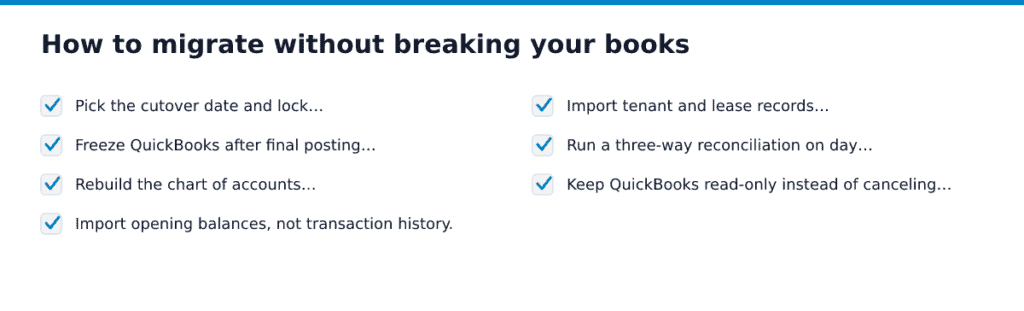
- Pick the cutover date and lock it. Use the day before as your last posting day in QuickBooks, and don’t move it once you start resident and owner notices.
- Freeze QuickBooks after final posting and reconcile every bank account through the day before cutover. Clear old uncleared items now, because unreconciled transactions come over as noise and bury real opening differences.
- Rebuild the chart of accounts in the new system before you import anything. Map each income and expense account to the Schedule E category you report from, and to the HUD Uniform Chart of Accounts if the property is subject to HUD reporting rules (HUD Housing Handbook, Chapter 3).
- Import opening balances, not transaction history. Bring in open tenant receivables by tenant, security deposit liability by unit, owner payable or equity by owner, and unpaid bills by vendor, then check that those control totals match your final QuickBooks reports.
- Import tenant and lease records with move-in date, deposit held, recurring charges, and any rent escalation schedule. Before any portal switch, send a dated notice to residents and owners, and make sure the new billing descriptor uses a name cardholders will recognize; our Category Archives: Property Management covers the operational side of those notices.
- Run a three-way reconciliation on day one and again at the first month-end close. Cash, tenant ledger totals, and deposit liability must tie, and you shouldn’t disburse to owners until they do.
- Keep QuickBooks read-only instead of canceling it right away. You need continued access to the records that support rental income, expenses, and depreciation for tax reporting and for the period those records must be kept (IRS Publication 527, Residential Rental Property).
You’re done when opening balances match the final QuickBooks file, the first month closes without unexplained variances, and the first owner statements come from one ledger only.
For a side-by-side of free and paid tools, see our comparison of property management accounting software.
Choosing Between the Categories of Property Management Accounting Software
One question sorts the field: whose money sits in your bank account. If it’s only yours, you need bookkeeping. If it belongs to owners or residents, you need trust accounting with per-property ledgers. And if any unit is federally assisted, you need a system built around HUD’s prescribed Uniform Chart of Accounts, since HUD requires project books and reports to stay comparable across projects and compatible with its automated systems (HUD Housing Handbook, Chapter 3). None of the vendors named below is a client, advertiser, or affiliate of ours. The categories are the point.
| Deciding criterion | |||
|---|---|---|---|
| Who owns the cash you hold | You do | Owners and residents | Owners, residents, and agencies |
| Trust accounting | No | Yes, with per-owner ledgers | Yes, with audit trails |
| Owner portals and statements | Not applicable | Standard | Standard, configurable |
| HUD/LIHTC compliance modules | No | Rarely | Yes |
| Tax output | Schedule E | Schedule E plus 1099 filing | Full GL, agency reporting |
| Pricing shape | Flat subscription | Per unit with a monthly minimum | Quoted, with an implementation project |
| Time to first close | Days | Weeks | Months |
Category A wins when every door is yours and the year ends on a Schedule E. Category B wins the moment you collect rent you don’t own, and the per-unit minimum is what makes it painful under roughly fifty units. Category C wins when a subsidy contract or a mixed-finance deal puts an agency in the reporting chain, and it loses everywhere else because you’ll pay for depth you never open.
Pick your category first, then request two demos inside it and ask each vendor to run your trust reconciliation on your own numbers. Our Category Archives: Property Management Software has platform-by-platform breakdowns to build that shortlist from.
Frequently Asked Questions
Do I need a separate trust bank account for security deposits?
Yes, in most management setups, security deposits belong in a separate trust or escrow account, and the exact setup turns on your state landlord-tenant law, your brokerage trust-account rules, and any program rules on the property. The accounting issue isn’t just the bank title. Your system should track each tenant deposit as a liability, tie that liability to the cash in the deposit account, and let you reconcile both before you release any money; HUD-insured multifamily projects, for example, use segregated handling of security deposits rather than mixing them with operating cash (HUD, Multifamily Regulatory Agreement, form HUD-92466M) (HUD Handbook 4370.2 REV-1, Chapter 2).
Can I run two entities in one property management accounting system?
Yes, if the system gives each entity its own books inside the same login, with separate bank accounts, ledgers, payables, receivables, and entity-level reports. Don’t rely on classes or tags alone. They organize transactions, but they don’t fix paying a bill from the wrong bank account or issuing a vendor form under the wrong legal entity, and information returns are filed by the person or business that made the payment (26 CFR 1.6041-1).